
Most trade business owners I talk to do their admin at night: timesheets, late invoices, quotes nobody replied to, emails about a job that finished weeks ago. None of them started a plumbing or electrical business to do that, and most small firms can't justify paying an office team to do it for them.
ONYX1 Office is what I built for that gap. It's a Chief of Staff and five specialist AI agents that work from the business's own data, for trade and field service companies already on the ONYX1 platform.
I first published this on 5 October and updated it on 11 October. Two things have shipped since: an animated view of the office, and routines that run on a schedule. Signed automatic updates for the office computer are coming.
The office today
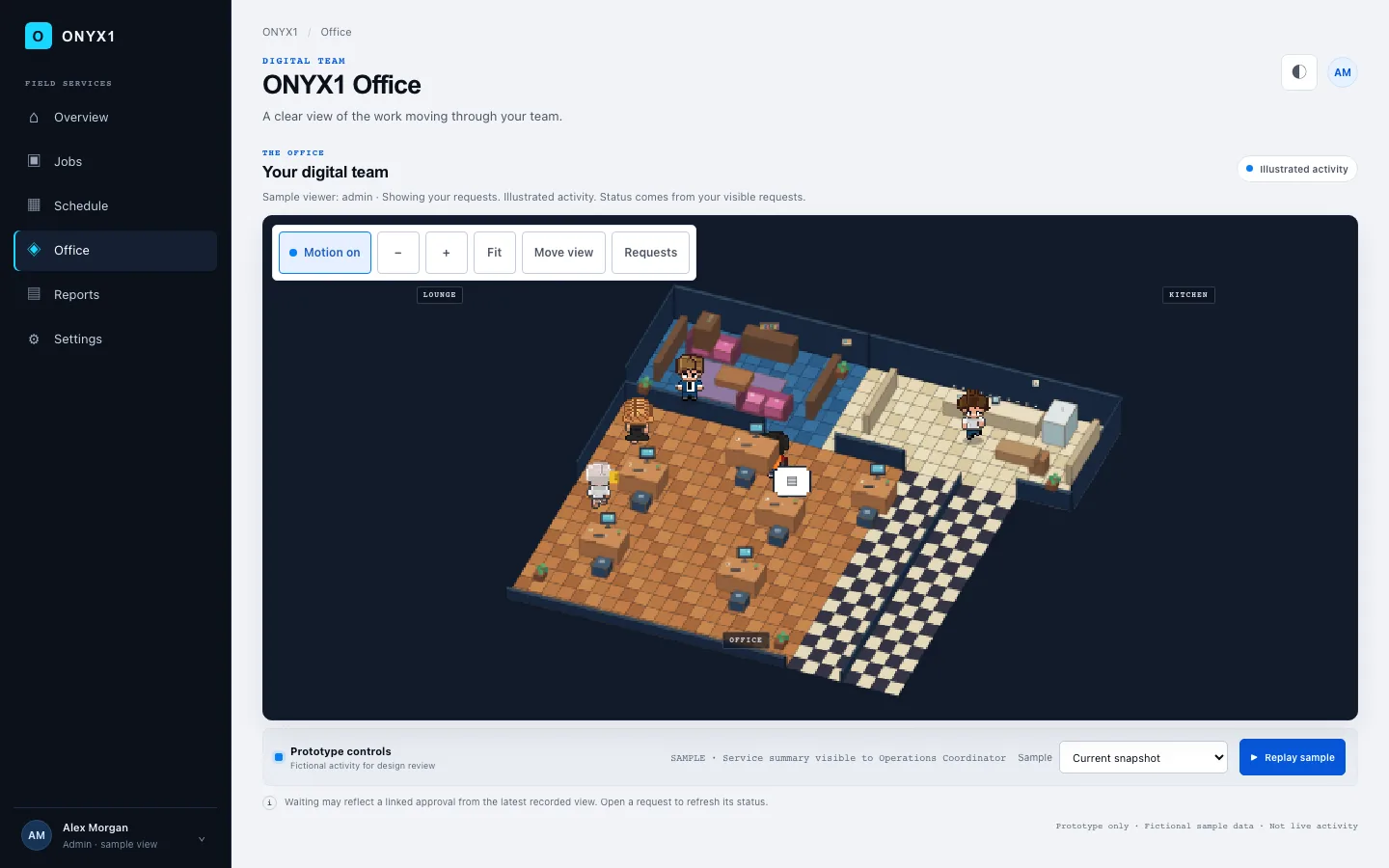
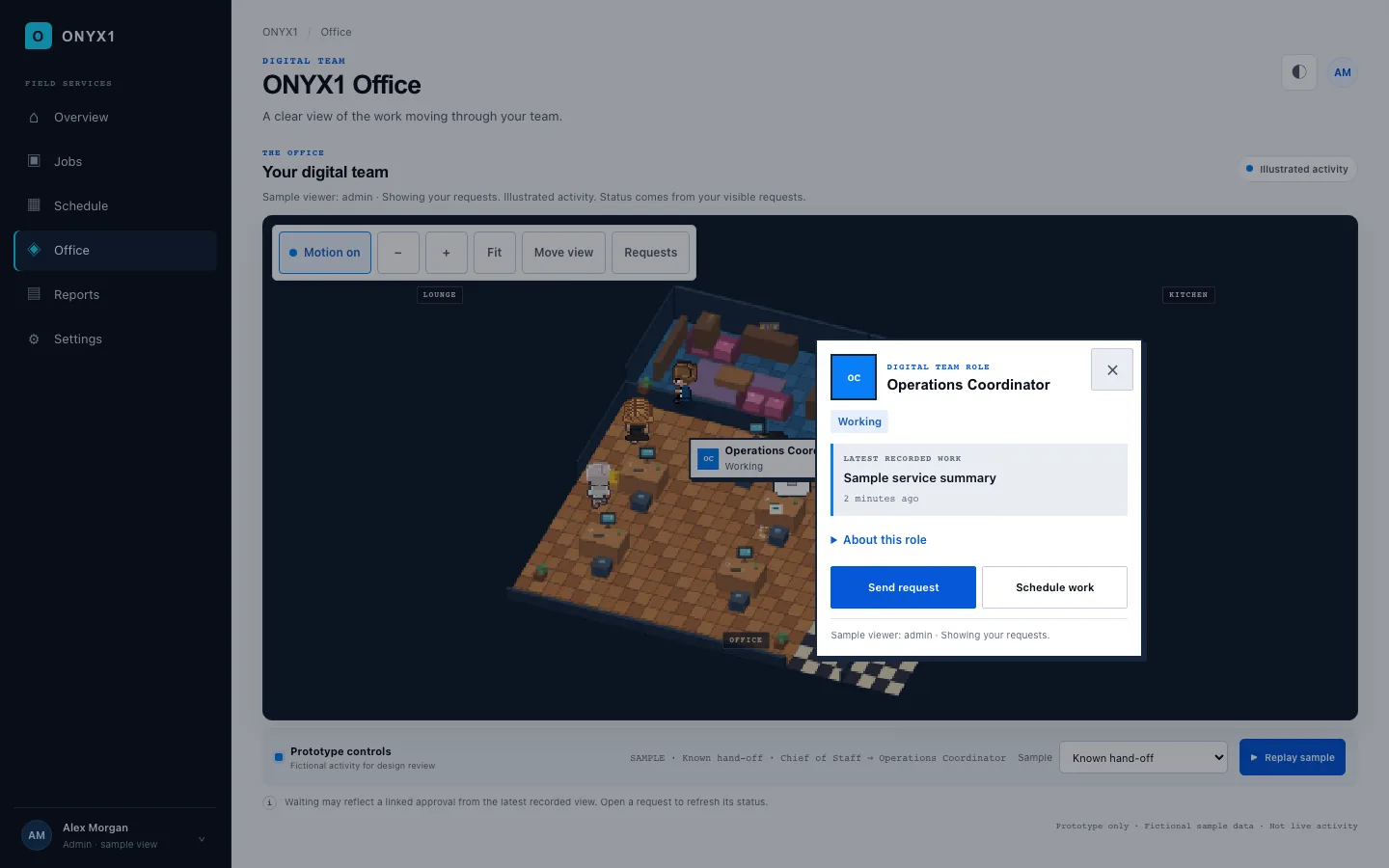
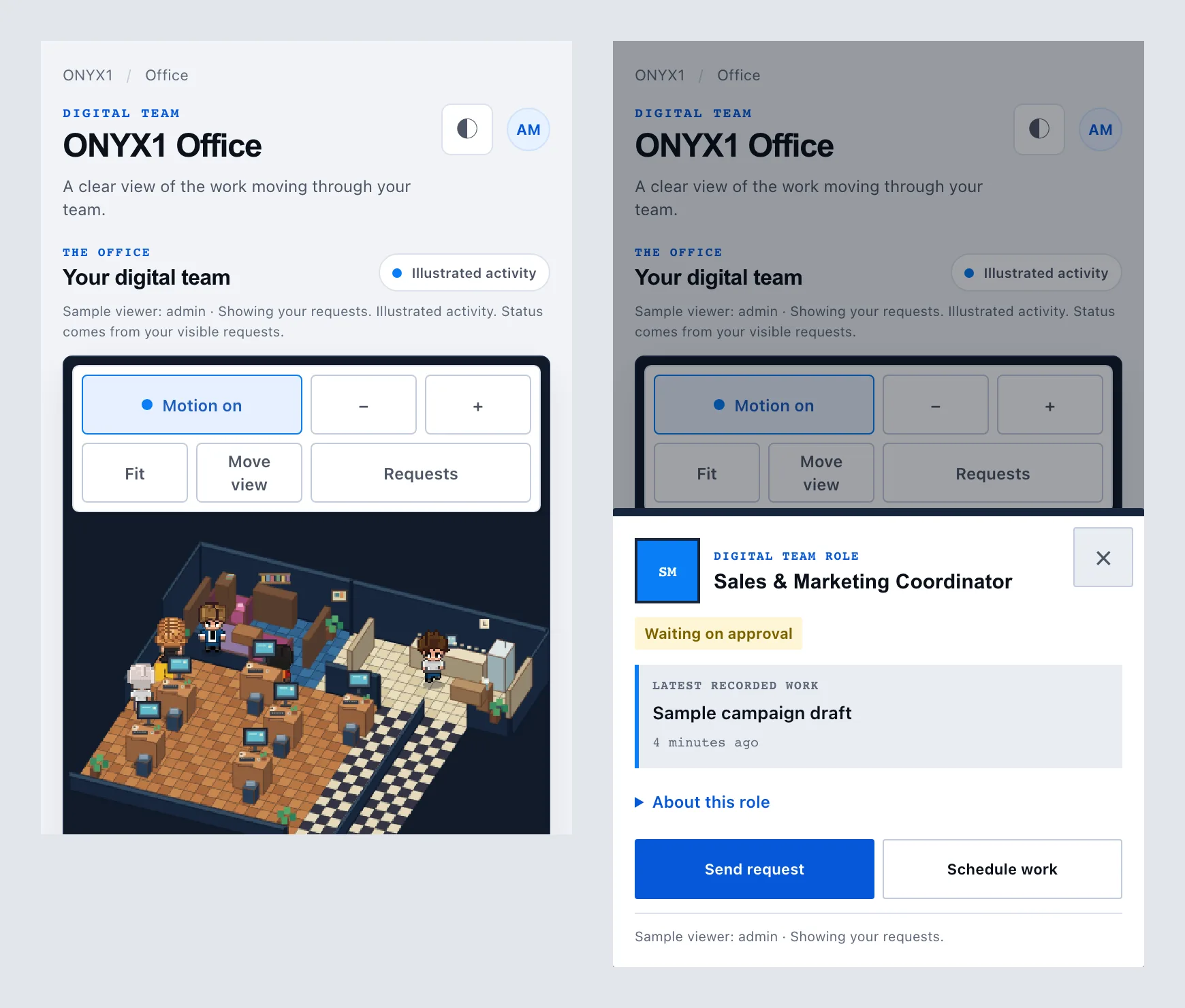
The Office page can show the team as a small pixel-art office, with each role as a character at a desk. These screenshots are from the design prototype, so the activity in them is made-up sample data, not a real business.

The short version
- Six agents, each with one job, working across ONYX1 and the business's Microsoft 365.
- They run on a small computer the business owns, using the business's own Claude account. ONYX1 never pays for that usage and never sees it.
- Every request runs as the person who asked, with that person's permissions. That is enforced where the data is stored, not by the AI.
- The agents read, check and draft. A person approves anything that leaves the business.
- New: an animated Office view, and scheduled routines such as a morning brief. Both are off until the owner switches them on.
- Three real limits: the office machine has to stay on, big requests are slow, and updates aren't automatic yet.
What it's for
What a trade business needs from an office is someone who notices things. A chatbot only helps when someone thinks to ask it, and the point of a good office manager is that nobody has to.
Here's the sort of thing that lands in a morning briefing. One of the sparkies logged a nine-hour day yesterday with no break recorded, so the timesheet is held before payroll. The van booked for a switchboard upgrade on Friday is also down for a callout across town that afternoon. The quote sent to the Hendersons two weeks ago still has no reply. None of it is hard to fix. It's just work nobody had time to go looking for.
Six roles
I split the work the way a small office splits it, so each agent owns one area and has a hard limit on what it does alone.
The six-role AI office
A table of six roles, from the Chief of Staff to the Chief Legal Officer, listing what each owns and the one thing it never does without a person.
| Role | Owns | Never does alone |
|---|---|---|
| Chief of Staff | Splits broad instructions across the team and runs scheduled reports | Acts alone on anything that leaves the business |
| People and Office Administrator | Timesheet checks, leave requests and staff licensing | Approves its own findings |
| Operations Coordinator | Scheduling, vans, crew lists and job blockers | Overrides a safety requirement |
| Sales and Marketing Coordinator | Pipeline, cold quotes, job variations and client orders | Sends a quote unreviewed |
| Finance and Business Analyst | Cash flow forecasts, late invoices and the Xero link | Moves money |
| Chief Legal Officer | Compliance notes with sources | Replaces a lawyer |
Narrow jobs with clear limits are what make a team of agents dependable.
Most of the time you talk to the Chief of Staff. When a request touches several areas, it hands the parts to the specialists and gives you back one answer. You can also send a request straight to one role.
Three of the specialists need more than a line in a table:
- People and Office Administrator. Checks timesheets against more than twenty rules in the background: missed safety forms, missing breaks, hours that don't add up. You find out before payroll, not after.
- Finance and Business Analyst. Tracks late invoices and builds cash flow forecasts. It has a two-way link with Xero, so it works from the same numbers as your accountant.
- Chief Legal Officer. Writes compliance notes with sources, and tells you when the question needs a real lawyer. I think that second part is the most useful thing it does.
The animated office
An AI office staff has a visibility problem. In a human office you can see who's on the phone and who's buried in paperwork. Software agents do their work out of sight, and the usual fix is a log you have to go and read.
The animated view puts that on screen instead, so an owner can see at a glance who is working on what.
- What it shows. Each role is a character at a desk. A character moves between idle and working as real requests come in, so a busy office looks busy.
- What you can do from it. Click a role to see what it's working on. From the same panel you can send it a request or schedule some work.
- How work maps to characters. One role is one character, and the state comes from the requests that role is handling. It isn't an animation running on a timer.
- Who controls it. The owner switches it on in Settings. It's off by default.
- What it can't do. It's presentation only. It never grants access to anything, and permissions apply to every request as before.
- Accessibility. It respects the reduced-motion setting on your device, so nobody is made to watch characters move around.
It adds no capability. It shows work that is already happening.
Scheduled work
The owner can switch on routines that run on a schedule, such as a morning brief at 7am on weekdays. ONYX1 runs the schedule itself, so nobody has to ask.
Software that acts on its own needs limits more than software that waits to be asked, so every scheduled run has them:
- It has to pass admission checks before it starts.
- It runs under limits on time, tokens and tools.
- Spend is capped.
- Every run leaves an audit trail.
- There are two kill switches, one for the business and one for the whole platform.
An external action still needs a person's approval, scheduled or not. Scheduled work is off until the owner switches it on.
Microsoft 365
Most trade businesses already run on Microsoft 365: quotes in Outlook, schedules in calendars, paperwork in shared files. I didn't want anyone to move any of it.
ONYX1 is a verified Microsoft publisher, and the connection is a published Microsoft app. The customer signs in with their own Microsoft account, the same way they would for any other Microsoft app, and their Microsoft 365 information reaches the agents alongside what's already in ONYX1. That account decides what the agents can reach.
Where the data lives
A lot of AI tools want your business data in their cloud, alongside everyone else's. For a firm whose pricing and customer list are what keep it competitive, I don't think that's a fair ask.
So the data and the processing stay on a small computer in the owner's office. Staff reach it through the AI tools they already use. The office makes the connection outward, so nothing in the office has to be opened up to the internet. I'm leaving out the setup detail on purpose. What matters is that the records stay on hardware the business owns.
The AI itself runs on the business's own Claude account. ONYX1 never pays for that usage and never sees it.
What an agent can see
The usual worry with an AI that can read business data is that someone writes a clever prompt and talks it into showing something it shouldn't.
I didn't want to rely on the AI saying no. Every agent call runs as the person who asked, and it is checked against that person's permissions at the point where the data is stored. If a field technician asks about an invoice they aren't allowed to open, the system can't fetch it for them. The AI has nothing to leak because it never receives the data.
Approval before anything goes out
Owners are right to be wary of software that emails customers or touches money, so the agents prepare the work and a person releases it.
From request to sent message
Five steps: a request, a draft held in the sender's mailbox, a plain read-back, a time-limited human approval, and automatic cancellation if the draft changes.
- 01RequestSomeone asks the staff to contact a customer.
- 02DraftThe message is written into the sender's own drafts. Nothing is sent.
- 03Read-backThe owner sees the recipients, the exact wording and the risks.
- 04ApproveA person approves within a short window.
- 05Void on editChange the draft and the approval is cancelled.
The rule: the AI can prepare anything, but only a person can release it.
Outgoing messages are written as drafts in the sender's own mailbox. Before approving, the owner sees who it's going to, the exact wording and what could go wrong. The approval expires after a short window, and editing the draft inside that window cancels it, so what gets sent is what was approved.
Day to day
Owners can set standing orders. One of mine is a morning briefing: unbilled jobs, overdue invoices, schedule clashes and what needs attention today. With scheduled work switched on, that briefing runs by itself.
Field crews talk to it in plain language and the rules run underneath. A technician can't log billable hours until the site's health and safety paperwork is signed, so nobody in the office has to chase it.
Limits
- The office machine has to stay on. If the office loses power or internet, the agents can't be reached. The platform checks on the machine regularly and sends management an SMS and an email if it goes quiet.
- Big requests are slow. A request that spans several agents can take a minute or two. The system queues it and you come back for the result.
- Updates aren't automatic yet. Right now keeping the office computer up to date means someone running scripts or carrying a USB stick. Signed automatic updates are coming, so nobody has to.
I haven't measured hours saved, so there's no number in this post. I expect it to save owners time, but I haven't run it across enough businesses to say how much.
Questions
Do I need an IT department?
No. Setup is handled for you, including the Microsoft 365 sign-in and the Xero connection. The hardware is a small, low-power machine.
Can the AI email a customer on its own?
No. It writes a draft, and a person approves it before anything is sent.
Who pays for the AI?
The business does, through its own Claude account. ONYX1 never pays for that usage and never sees it.
Can the agents run on their own?
Only if the owner switches scheduled work on, and only within time, token, tool and spend limits. Anything that goes outside the business still waits for a person's approval.
Does the animated office give anyone more access?
No. It's a picture of the work and it's off by default. Permissions apply to every request exactly as they did before.
Is my data used to train anything?
No. Your business records stay on your own hardware and aren't pooled with other companies' data. Requests to the AI go through your own Claude account, so that account's terms apply to them.
What if the AI gets something wrong?
That's what the approval step is for. Nothing reaches a customer until a person has read it, and the legal agent tells you when a question needs a professional.